


Sign Language ASL Pocket Sign
4.82.69K Reviews
App Specs
- Version
- 3.2.8
- Updated On
- License
- Free
- Downloads
- 1,000,000+
- Developer
- MobiReactor
- Categories
- Education
- Platform
- Android, iOS
Screenshots
 Analysis by AppCompare
I usually recommend starting with a clear goal when learning a language: perhaps you want to recognize a few everyday signs, communicate more comfortably with someone close to you, or decide whether you’re ready for a structured course. For an approachable first step into American Sign Language, Sign Language ASL Pocket Sign gives you a way to study through video lessons and look up signs in a dictionary. I’d treat it as a learning aid rather than a shortcut to fluency, but that distinction is exactly what makes it useful: you can build a routine without needing to plan a whole course before you begin.
Choosing the right way to learn
Before choosing any ASL resource, I’d ask what kind of help I actually need. If I want to explore signs in short sessions, a mobile app is more convenient than a book or a long class. If I need correction on my handshape, movement, or expression, though, a lesson I watch on a screen cannot fully replace feedback from a fluent signer or teacher. That is the key decision here: Pocket Sign is suited to guided self-study, not to every part of learning a visual language.
The app is free to install, and its education focus makes sense for someone who wants a low-friction starting point. It is made by MobiReactor, has an Everyone content rating, and has a 4.8 average from around 32,000 ratings. Those figures suggest it has found an audience, but I wouldn’t use popularity as a substitute for checking whether its teaching style fits me. I’d try a lesson, see whether the video demonstrations are easy to follow on my device, and then decide whether I want to make it part of my routine.
Where Pocket Sign is most useful
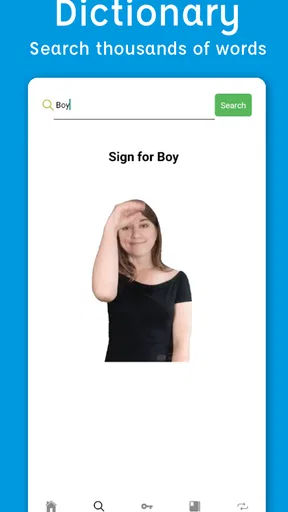
The combination of lessons and a dictionary is a practical advantage. A lesson gives a sign some context, while a dictionary is more useful when I have a specific word in mind. Rather than opening a general search engine, I can use one place for both a planned study session and a quick lookup. That can help prevent a common beginner habit: collecting isolated signs without thinking about how they relate to a conversation.
For example, I might spend a few minutes learning a small set of signs, then revisit the dictionary later when I want to recall one of them. A useful personal workflow is to choose a simple situation—greeting someone, asking a basic question, or sharing a need—and study signs that belong together. I’d then practise recalling them without immediately looking at the screen. This turns a quick browse into deliberate practice, even if the app itself is only one part of the learning process.
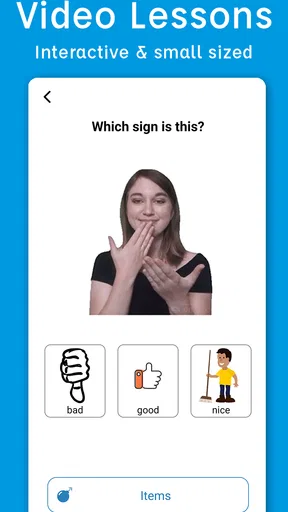
Video matters especially in ASL because a still image can’t show the full movement of a sign. I’d watch a demonstration more than once, paying attention to the start and finish as well as the motion in between. A helpful trick is to pause after viewing, try the movement from memory, and then replay the clip to compare. That doesn’t prove my signing is correct, but it makes me a more attentive learner than simply scrolling through definitions.
How it compares with other learning options
Compared with a printed reference, a video-based app is better for seeing a sign in motion and more convenient for short practice sessions. A book can be easier to browse slowly or keep open beside you, while a mobile dictionary is handy when a question occurs during the day. Pocket Sign’s value is in bringing lessons and reference material together, rather than making either format unnecessary.
Worth Reading Before You Choose

EA SPORTS FC Mobile 26 Is a Bigger Football Game, but It Takes Time

Flipboard Shows What News Apps Must Do Beyond the Feed

Switching to Android Auto Means Rethinking Your Driving Routine

Google Calendar Makes a Crowded Week Easier to Manage

Ludo King Makes the Most of the Minutes Between Plans

Baby Panda World Brings Quick Play to Modern Phones, but Its Game Library Feels Busy
It also occupies a different place from a live class. A class or tutor can respond to questions, notice errors, and help with the visual details that are hard to judge alone. Pocket Sign can make it easier to arrive at that kind of instruction with some familiarity, or to review between sessions, but I wouldn’t expect an app to assess every detail of my signing. If accurate communication is important for work, caregiving, or a close relationship, I’d combine self-study with practice involving people who know ASL well.
Video lessons are not automatically the right format for every learner, either. If I prefer a formal syllabus, regular teacher feedback, or direct conversation practice, a class-based option may be a better main resource. If I only need to check an occasional sign, a dictionary alone may be enough. The advantage here is a compact place to begin; the trade-off is that independent study puts more responsibility on me to review and seek feedback.
A realistic routine, not a rushed course
Imagine I’m preparing to spend time with an ASL-using friend or relative. I could use a short session to learn a few relevant signs, return to the dictionary when I forget one, and practise the sequence before we meet. I would keep my goal modest: make an effort to communicate, not assume a handful of lessons will prepare me for every topic. That approach makes the app useful without putting the burden of a real conversation on a memorized list.
For everyday study, I’d keep a small note of signs I repeatedly forget and revisit those before adding a large batch of new material. I’d also practise looking away from the screen after watching a demonstration. The screen can prompt me, but real communication won’t always give me time to replay a video. This simple shift from recognition to recall is a meaningful way to test whether a sign is sticking.
Another trade-off is pacing. Self-directed learning makes it easy to study when I have a spare moment, but it also makes it easy to skip practice when life gets busy. I’d choose a realistic routine that I can keep—perhaps a brief session on days when I have time—rather than setting an ambitious target and abandoning it. The app is most useful when I return to it consistently, not when I try to absorb everything in one sitting.
Cost, compatibility, and commitment
The app is free, with in-app purchases ranging from $5.99 to $129.99 per item. I’d start by exploring the free experience and only consider a purchase after I know how often I use the lessons and dictionary. The listed range is broad, so I would check the exact item and its terms in the app before paying rather than assuming every learning resource is included at no cost. For a casual learner, that pause matters: paying makes sense only if the material supports a goal I’m actively pursuing.
It has passed one million installs, and the current version is 3.2.3. It supports Android 5.0 and later, which gives it a broad range of compatible Android devices. Those practical details make it easier to decide whether to try it, but I’d still judge the experience by how comfortably I can watch demonstrations and study on my own screen. A video lesson that is hard to see or follow is less helpful, whatever the install count.
If I decide to move to a course, tutor, or another reference, the study habits I build here can carry over: reviewing signs, practising recall, and grouping vocabulary around situations. Switching resources does not mean starting from nothing. Still, I would avoid treating one app’s organization as a complete curriculum. If I need a particular kind of progress, I’d choose the next resource based on that need—feedback, conversation, a more formal sequence, or quick reference—rather than simply collecting more apps.
How the learning experience holds up
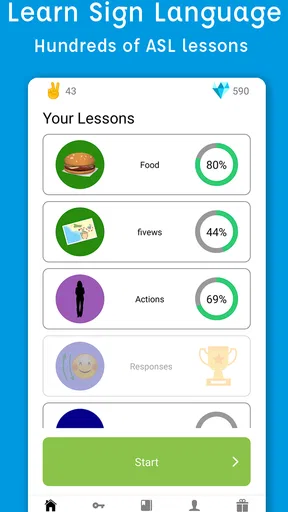
When I first opened the app, I was greeted by a clean and straightforward interface. The design is intuitive, so you won’t find yourself fumbling around trying to figure out where to begin. Everything is laid out in a way that makes sense, with clear categories and easy navigation. It’s the kind of app where you can jump right in and start learning without any hassle.
Interactive Lessons
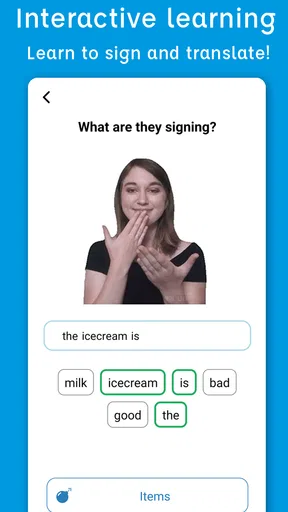
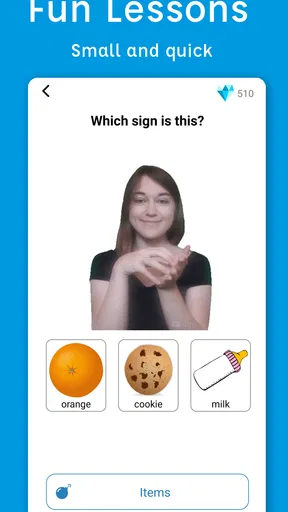
What I loved most about Pocket Sign is the interactive lessons. These aren’t your typical textbook-style lessons; they’re engaging and designed to keep your attention. The app offers a wide range of topics, from everyday phrases to more complex conversations, and each lesson includes videos of native signers demonstrating the signs. It’s like having a personal tutor right in your pocket!
The lessons are bite-sized, which means you can easily fit learning into your busy schedule. Whether you have five minutes or an hour, you can make progress. Plus, the app remembers where you left off, so you can pick up right where you left off anytime.
Practice Makes Perfect
One of the standout features for me is the practice mode. After you've gone through a lesson, you can test your skills with quizzes. It’s a fantastic way to reinforce what you’ve learned and ensure you’re retaining the information. The quizzes are interactive and provide instant feedback, so you know exactly what you need to work on. It’s a real confidence booster!
Real-Life Scenarios
Another thing I appreciate about the app is its focus on real-life scenarios. The lessons aren’t just random signs thrown together; they’re grouped in a way that makes sense for actual conversations. Whether you’re looking to communicate at work, in social settings, or even at the doctor’s office, the app covers a wide range of situations. It’s practical and relevant, which makes learning all the more rewarding.
Community and Support
Learning a new language can be daunting, but having a community makes all the difference. The app includes a community feature where you can connect with other learners. It’s a great way to share tips, ask questions, and find encouragement. Plus, the app’s support team is responsive and helpful if you ever run into any issues.
Who should give it a try
I’d recommend it to curious beginners, people who want a portable way to review ASL, and learners who benefit from seeing demonstrations rather than relying on written descriptions. It may also suit someone who wants to make a first step before joining a class, or who already studies elsewhere and wants a convenient practice companion. The Everyone rating reflects broad accessibility, but the app’s learning value still depends on the learner’s goals and willingness to practise.
I’d be more cautious if I needed a complete, instructor-led program or immediate confidence in a high-stakes conversation. In those situations, an app can help with preparation, but I’d look for direct teaching and real interaction as well. I’d also skip it as my only resource if I knew I needed detailed correction: watching a sign and receiving feedback on my own signing are different things.
A grounded recommendation
Overall, I can’t recommend Sign Language ASL Pocket Sign enough. It’s an accessible, engaging, and effective tool for anyone looking to learn ASL. Whether you’re a complete beginner or looking to brush up on your skills, this app has something to offer. It’s a convenient way to learn at your own pace and connect with a community of learners. So why not give it a try? You might just find it’s exactly what you’ve been looking for.
My practical advice is to begin with a clear, small goal, use the lessons to build context, and return to the dictionary when you need a reminder. Treat quizzes as a way to spot what deserves another look, not as proof that you are ready for every conversation. If the approach suits you, the free starting point makes it easy to explore; if you need more structure or personal correction, use it alongside a class or another form of human instruction. That is where this app makes the most sense: as a convenient, encouraging part of learning ASL, with its limits kept in view.
Pros
- User-friendly interface for beginners.
- Includes video tutorials for clarity.
- Offline access available for learning anytime.
- Comprehensive vocabulary coverage.
- Interactive quizzes enhance retention.
Cons
- Limited advanced content for experienced users.
- Occasional app glitches need fixing.
- High-quality features behind a paywall.
- No option for customizing learning paths.
- Ads can be distracting for free users.
FAQs for Sign Language ASL Pocket Sign
What is Sign Language ASL Pocket Sign?
Sign Language ASL Pocket Sign is an educational app designed to teach users American Sign Language (ASL) through interactive lessons and exercises. It provides a comprehensive way to learn ASL with features such as video tutorials, quizzes, and a dictionary of common signs. It's suitable for beginners and anyone looking to improve their ASL skills.
Is Sign Language ASL Pocket Sign suitable for complete beginners?
Yes, the app is designed to accommodate complete beginners. It offers step-by-step lessons that start with basic signs and gradually move to more complex phrases and conversations. The interactive tutorials and quizzes help reinforce learning, making it accessible even if you have no prior experience with sign language.
Are there any in-app purchases or subscriptions required?
While Sign Language ASL Pocket Sign offers a range of free content, it may include in-app purchases or subscriptions for additional features or advanced lessons. These options provide users with more extensive learning materials and personalized learning paths, but basic lessons are available for free to get started.
Can I use Sign Language ASL Pocket Sign offline?
The app allows you to download lessons for offline use, which is perfect for learning on the go without needing continuous internet access. However, some features, like updates or community interactions, may require an internet connection to function correctly.
How accurate are the signs and lessons in the app?
The app is developed in collaboration with ASL experts to ensure accuracy and effectiveness. Video tutorials are created by fluent ASL speakers, providing clear demonstrations of each sign. Regular updates help maintain the app's reliability, making it a trusted tool for learning ASL.


